
- INTERNET
-
-
- Internet Services

Fixed Wireless Speeds up to 10 Gbps. Internet via a wireless connection between two fixed points. No construction required.
Fiber Internet Speeds up to 1 Tbps. Internet via a hard-line fiber connection direct to your location. Construction may be required.
SD-WAN Internet 5G Speeds up to 300 Mbps. Shipping Nationwide. Cellular internet with no setup or construction required. Just plug and play.
Satellite Internet High-speed satellite internet almost anywhere. Professionally installed, managed, and perfect as a backup connection.
Specializing In
Public Spaces One-stop shop for internet and Wi-Fi for Hotels, Private Clubs, Parks, Marinas, Airports, Districts, Community Centers and Conference Centers
Smart Districts Connected Wi-Fi, cameras and sensors that power a whole downtown district.
Commercial Multi Dwelling Units Do you own a mixed-use property with multiple units? Offer internet to your tenants and create a new revenue source.
Temporary Connections Need internet for a short period of time? Special Events, Construction Sites, Concerts, Conferences, Trade Shows, TV and movie production, media and press events.
Detroit Wi-Fi Initiative Bringing Wi-Fi to Detroiters for free.
-
-
- CLOUD
-
-
- Phone Service
VoIP Phone System Hosted business phones with auto attendant, voicemail-to-email and mobile apps.
POTS Line Replacement Replace copper phone lines for fire alarms, elevators and fax with managed cellular.
Managed Services Managed Wi-Fi We design, monitor and manage your Wi-Fi 24/7, including guest splash pages.
Managed Firewall Managed firewall, content filtering and threat protection for every site.
Multi-WAN Router Combine fiber, fixed wireless and 5G with automatic failover so you never go offline.
Virtual MPLS A private, secure network linking all your locations over any internet connection.
Security Services Surveillance Monitor Security cameras with secure cloud recording and remote viewing, fully managed.
Zone Monitor People counting, live occupancy, dwell time and crowd alerts from your cameras.
Camera Time Lapse Live camera streams and time-lapse videos of your job site, event or venue, hosted in the cloud.
-
-
- INDUSTRIES
-
-
- Industries
Accounting & Legal Secure, private networks for accounting firms and law offices that protect client data.
Airports Secure, redundant networks for terminals, operations, parking and tenants.
Community & Nonprofits Affordable, reliable internet and Wi-Fi for community centers, churches and nonprofits.
Construction Fast job-site internet with fixed wireless, 5G and Wi-Fi suitcases. No waiting on wires.
Education Secure, high-capacity networks for schools, colleges and training centers.
Financial Services Redundant, compliant connectivity for banks, credit unions and financial advisors.
Government Redundant, secure connectivity for city, county and public-safety agencies.
Healthcare & Dental Secure internet for medical practices, dental offices, clinics and senior living.
Hospitality Guest Wi-Fi for hotels, banquet facilities, private clubs and resorts.
Manufacturing Always-on connectivity for plants, warehouses and industrial IoT.
Parking Pay stations, gates, cameras and call boxes for surface lots and garages.
Private Clubs Member-grade Wi-Fi for country, golf, yacht and athletic clubs.
Real Estate Internet and Wi-Fi for brokerages, property managers and buildings across Detroit.
Restaurants Reliable internet and guest Wi-Fi that keeps your POS and online orders running.
Retail Dependable Wi-Fi and backup internet that keep stores and checkout lines moving.
Stadiums & Large Venues High-density Wi-Fi for stadiums, arenas, festivals and major events.
Transportation & Logistics Connectivity for fleets, depots, parking, airports and logistics hubs.
Utilities Resilient networks for utility sites, substations and field operations.
-
-
- COMPANY
-
-
- Company
Our Mission Better internet for all. Trusted since 2008, we have been in business for more than a decade.
Community Engagement How we give back: public Wi-Fi, Project Green Light, local partnerships and Detroit community projects.
Success Stories Customer testimonials and case studies: "Hands down one of the best internet service companies in the state".
Owners & Developers Increase rental retention and property value, and create another revenue source.

Live Camera Feeds Live camera feeds from our webcams around town.
Careers Join our growing team. We are laser-focused on building the internet company of the future.
Policies Billing, privacy and text messaging policies.
Press Cronus in the news: Greektown, Detroit park Wi-Fi and more.
Media Kit Cronus logos, brand colors and usage guidelines.
Contact Us We would love to talk.
-
-
































- INTERNET
-
-
- Internet Services
Fixed Wireless Speeds up to 10 Gbps. Internet via a wireless connection between two fixed points. No construction required.
Fiber Internet Speeds up to 1 Tbps. Internet via a hard-line fiber connection direct to your location. Construction may be required.
SD-WAN Internet 5G Speeds up to 300 Mbps. Shipping Nationwide. Cellular internet with no setup or construction required. Just plug and play.
Satellite Internet High-speed satellite internet almost anywhere. Professionally installed, managed, and perfect as a backup connection.
Specializing In
Public Spaces One-stop shop for internet and Wi-Fi for Hotels, Private Clubs, Parks, Marinas, Airports, Districts, Community Centers and Conference Centers
Smart Districts Connected Wi-Fi, cameras and sensors that power a whole downtown district.
Commercial Multi Dwelling Units Do you own a mixed-use property with multiple units? Offer internet to your tenants and create a new revenue source.
Temporary Connections Need internet for a short period of time? Special Events, Construction Sites, Concerts, Conferences, Trade Shows, TV and movie production, media and press events.
Detroit Wi-Fi Initiative Bringing Wi-Fi to Detroiters for free.
-
-
- CLOUD
-
-
- Phone Service
VoIP Phone System Hosted business phones with auto attendant, voicemail-to-email and mobile apps.
POTS Line Replacement Replace copper phone lines for fire alarms, elevators and fax with managed cellular.
Managed Services Managed Wi-Fi We design, monitor and manage your Wi-Fi 24/7, including guest splash pages.
Managed Firewall Managed firewall, content filtering and threat protection for every site.
Multi-WAN Router Combine fiber, fixed wireless and 5G with automatic failover so you never go offline.
Virtual MPLS A private, secure network linking all your locations over any internet connection.
Security Services Surveillance Monitor Security cameras with secure cloud recording and remote viewing, fully managed.
Zone Monitor People counting, live occupancy, dwell time and crowd alerts from your cameras.
Camera Time Lapse Live camera streams and time-lapse videos of your job site, event or venue, hosted in the cloud.
-
-
- INDUSTRIES
-
-
- Industries
Accounting & Legal Secure, private networks for accounting firms and law offices that protect client data.
Airports Secure, redundant networks for terminals, operations, parking and tenants.
Community & Nonprofits Affordable, reliable internet and Wi-Fi for community centers, churches and nonprofits.
Construction Fast job-site internet with fixed wireless, 5G and Wi-Fi suitcases. No waiting on wires.
Education Secure, high-capacity networks for schools, colleges and training centers.
Financial Services Redundant, compliant connectivity for banks, credit unions and financial advisors.
Government Redundant, secure connectivity for city, county and public-safety agencies.
Healthcare & Dental Secure internet for medical practices, dental offices, clinics and senior living.
Hospitality Guest Wi-Fi for hotels, banquet facilities, private clubs and resorts.
Manufacturing Always-on connectivity for plants, warehouses and industrial IoT.
Parking Pay stations, gates, cameras and call boxes for surface lots and garages.
Private Clubs Member-grade Wi-Fi for country, golf, yacht and athletic clubs.
Real Estate Internet and Wi-Fi for brokerages, property managers and buildings across Detroit.
Restaurants Reliable internet and guest Wi-Fi that keeps your POS and online orders running.
Retail Dependable Wi-Fi and backup internet that keep stores and checkout lines moving.
Stadiums & Large Venues High-density Wi-Fi for stadiums, arenas, festivals and major events.
Transportation & Logistics Connectivity for fleets, depots, parking, airports and logistics hubs.
Utilities Resilient networks for utility sites, substations and field operations.
-
-
- COMPANY
-
-
- Company
Our Mission Better internet for all. Trusted since 2008, we have been in business for more than a decade.
Community Engagement How we give back: public Wi-Fi, Project Green Light, local partnerships and Detroit community projects.
Success Stories Customer testimonials and case studies: "Hands down one of the best internet service companies in the state".
Owners & Developers Increase rental retention and property value, and create another revenue source.
Live Camera Feeds Live camera feeds from our webcams around town.
Careers Join our growing team. We are laser-focused on building the internet company of the future.
Policies Billing, privacy and text messaging policies.
Press Cronus in the news: Greektown, Detroit park Wi-Fi and more.
Media Kit Cronus logos, brand colors and usage guidelines.
Contact Us We would love to talk.
-
-
Zone Monitor
People Counting and Smart Camera Analytics
Turn the cameras you already have into a live count of who comes, who goes and who stays, with crowd alerts and reports for your security and operations teams.
How it helps
Know Exactly What Is Happening in Your Space
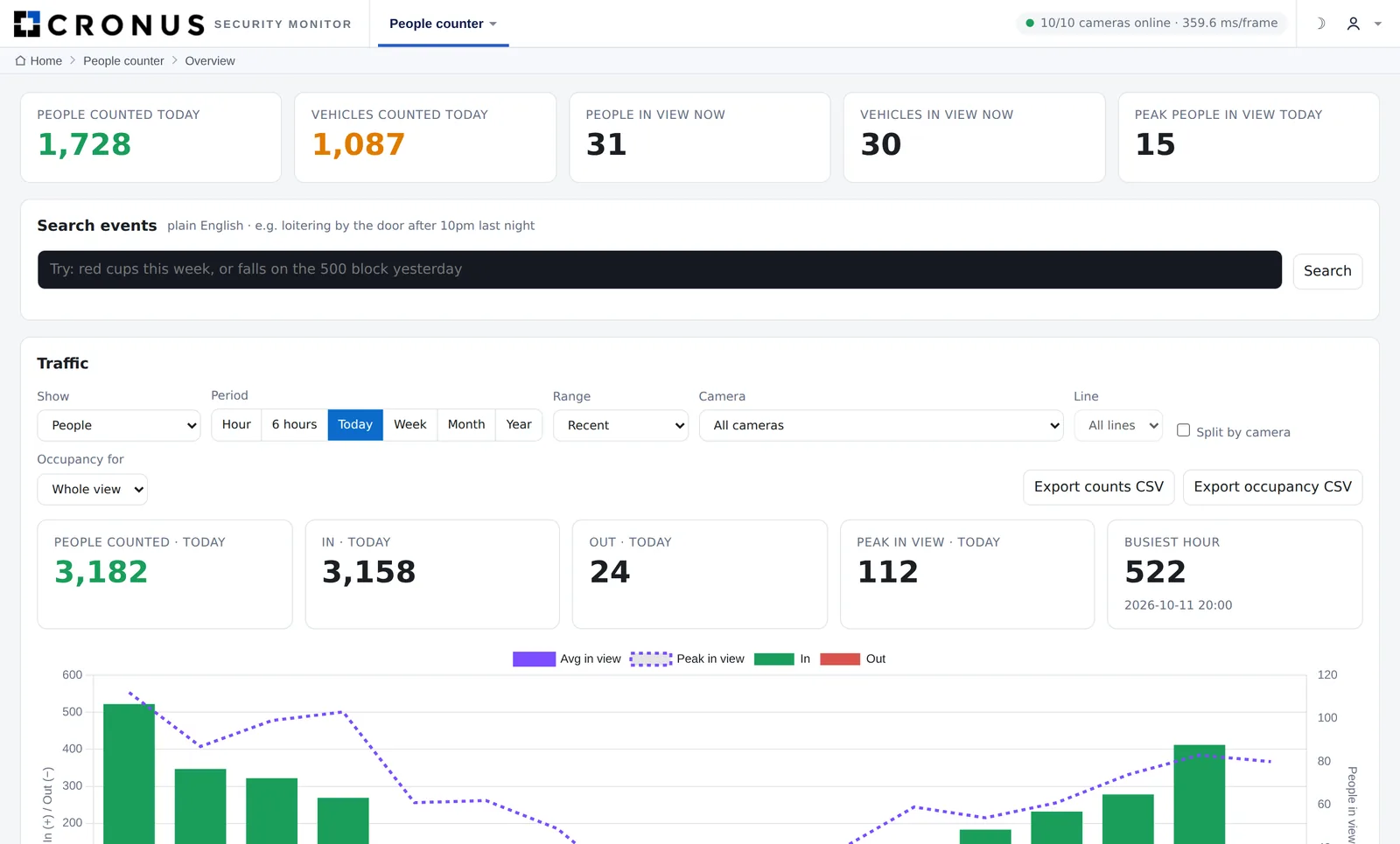
Zone Monitor watches your camera feeds and counts people as they move through doorways, gates and walkways. It shows how full each area is, how long people stay, and when crowds start to build.
It runs on a computer at your site and works alongside your existing video system, which keeps recording as normal. Cronus sets it up, draws the counting lines and zones for you, and supports it 24/7. It is already counting foot traffic in Detroit’s Greektown district.
What it measures
Everything You Need to Understand Foot Traffic
Every metric is available per camera, per zone and for the whole site.

In and Out Counts
Draw a counting line across any door, gate or walkway. Zone Monitor counts every person crossing, in each direction.

Live Occupancy
See how many people are inside each zone you draw, right now, plus the average and peak for every period.

Visits and Dwell Time
Know how many people enter an area and how long they stay, so you can spot lingering and plan staffing.

Crowd Alerts
Get an alert when a zone holds too many people, sent to your dashboard, Microsoft Teams, Slack or email.

Reports and Exports
Stats by the minute, hour, day, week or month, scheduled email reports and one-click Excel exports.

Live Annotated View
Watch any camera with the counting lines, zones and tracked people drawn on top, so you can see exactly how it counts.
How it counts
Counting Lines and Zones, Explained
Counting lines are drawn across a doorway, gate or sidewalk. Every time a person crosses the line, Zone Monitor adds one to In or Out, depending on the direction.
Zones are areas you draw on the camera view, like a patio, a lobby or a block of a street. Zone Monitor keeps a live count of how many people are inside each zone and how long they stay.
People are tracked as anonymous shapes from frame to frame, so the same person is not counted twice, and nobody is identified. Lines and zones can be added or moved at any time.
Example: a counting line on the entrance and an occupancy zone on the patio.
Your dashboard
What Every Number Means
Pick any camera, zone or the whole site, then choose minute, hour, day, week or month.
Every person who crosses a counting line, in each direction. Lines go across doors, gates, stairs or sidewalks.
In minus out for a period, so you can see whether a space is filling up or emptying out.
How many people are inside a zone at this moment, updated live.
The typical and highest number of people in a zone for any hour, day or week, and when the peak happened.
How many separate people entered a zone, even if they never crossed a counting line.
How long people stay in a zone on average, so you can spot lingering or long waits.
The total number of different people a camera saw during a period.
Every number rolls up per camera, per zone and for the whole property.
Examples
How Customers Use Zone Monitor
The same cameras answer different questions for different businesses.
Greektown, Detroit
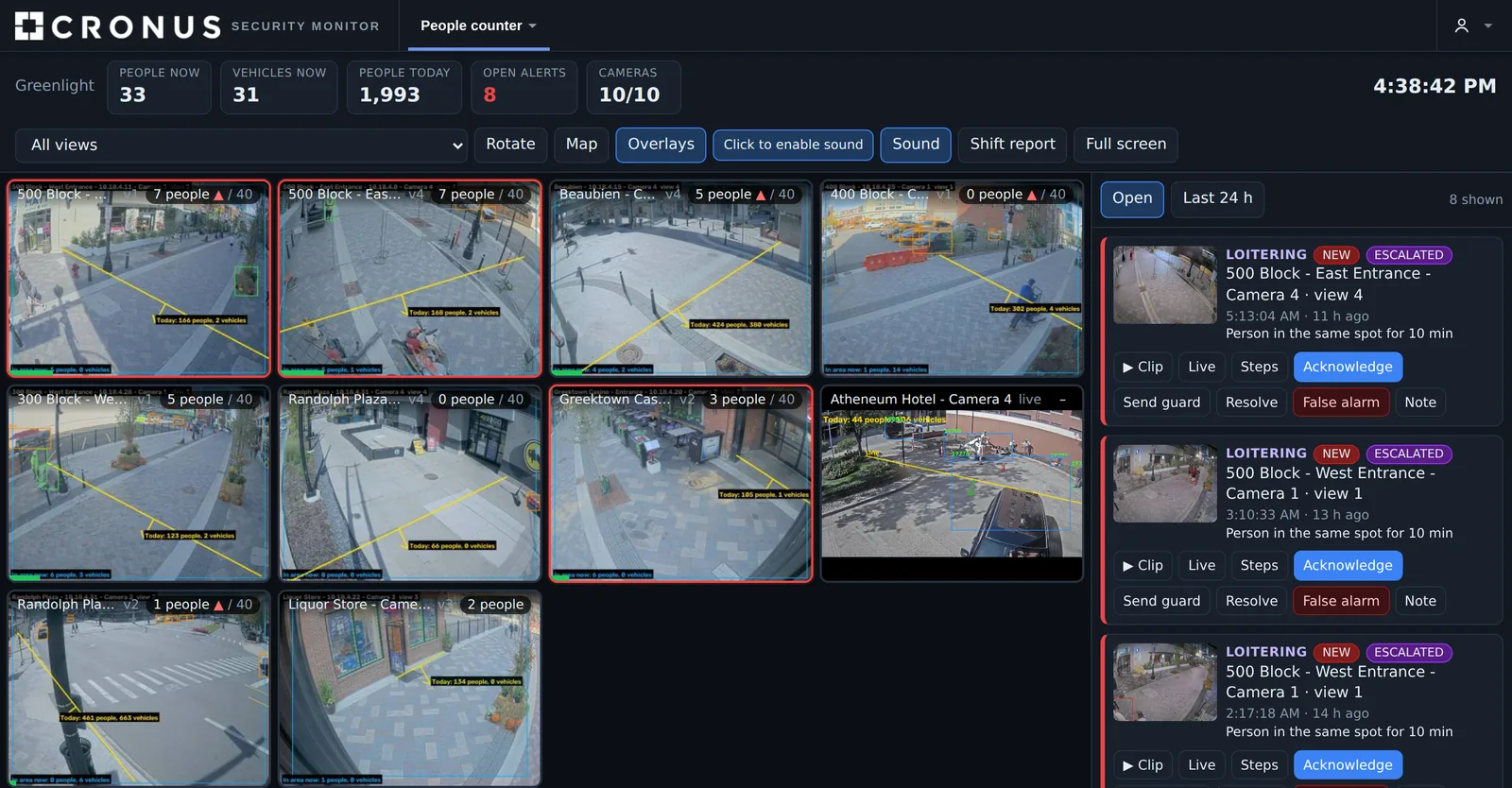
Zones cover busy blocks on Saturday nights. When a block holds more than the set number of people for 10 seconds, security gets a Teams alert and can send staff before a crowd becomes a problem. AI also flags open intoxicants and loitering. Weekly reports show which hours and streets are busiest.
Capacity limits
Counting lines on every door keep a live occupancy number next to your posted capacity. An alert at 90% lets the door staff slow entry before you hit the limit, and the night’s peak is saved for your records.
Staffing and conversion
Hourly door counts show exactly when shoppers arrive. Compare them with sales to see your conversion rate, and schedule staff for the hours that matter instead of guessing.
Gates and crowd flow
Counting lines on each gate show how fast fans are entering. If one gate is backing up, the operations team sees it live and opens more lanes or redirects the crowd.
Attendance you can prove
Daily and event attendance numbers make it easy to report results to sponsors, boards and grant programs, and to plan programming around the busiest days.
Building occupancy
Know how many people are in each building or floor right now and through the week, to plan cleaning, security staffing and space use.
Reports
A Weekly Report in Your Inbox
Zone Monitor can email a summary every morning, week or month. You see total traffic, how full each zone got and when the peaks happened, without logging in. Every report can be exported to Excel, and the data is available through an API for your own systems.
Sample numbers shown for illustration.
| Day | In | Out | Peak in zone | Peak time |
|---|---|---|---|---|
| Mon | 1,204 | 1,188 | 62 | 11:30 AM |
| Tue | 1,318 | 1,295 | 71 | 12:15 PM |
| Wed | 1,276 | 1,260 | 66 | 12:05 PM |
| Thu | 1,690 | 1,652 | 118 | 8:40 PM |
| Fri | 3,945 | 3,880 | 241 | 10:20 PM |
| Sat | 4,812 | 4,377 | 286 | 11:05 PM |
| Sun | 2,130 | 2,101 | 133 | 3:30 PM |
Built for security teams
Alerts That Reach the Right People
When a zone holds too many people for 10 seconds or more, Zone Monitor sends an alert to the dashboard and to Microsoft Teams, Slack or email. Unanswered alerts can escalate, and camera health is watched around the clock.
A plain-English search lets your team ask questions like “crowd alerts on Saturday night” and jump straight to the events that matter.
- Crowd alerts with escalation
- Camera health monitoring
- Event mode for big nights and game days
- Weekly accuracy reports
AI detections
AI Detections, Live in Greektown
Zone Monitor runs AI video analytics on your existing cameras to spot problems as they happen. These detections are running today in the Greektown Smart District in downtown Detroit.
Open intoxicants
Flags open containers of alcohol in public areas, for districts with posted alcohol rules.

Loitering
Alerts when someone lingers in one spot too long, such as doorways, alleys and parking areas.

Fights and altercations
Recognizes aggressive behavior so security can step in before it escalates.

Slip-and-falls
Detects a person falling so help can be sent right away.

Intoxication
Spots people stumbling or lying down who may need assistance.

Crowd buildup
Warns when a block or zone gets too dense, using live people counts.
Fewer false alarms
Every flagged event can get a second check by AI before it is logged, and each alert includes the camera view so your team sees exactly what happened before responding.
Coming next
Weapon detection and thermal sensors are being added to the same platform. Ask us about adding any detection to your site.
Public safety
Works with Project Green Light
Zone Monitor runs on the same cameras that stream to the Detroit Police Department through Project Green Light Detroit. Live video goes to the Real Time Crime Center at DPD Headquarters, while Zone Monitor counts people, watches for problems and alerts your own security team.
- Cameras stream to the Real Time Crime Center at DPD Headquarters
- License plate recognition for vehicles entering the district
- Alerts with the camera view to security, Teams, Slack or email
- All on one Cronus network, monitored 24/7
How it works
Up and Running in Four Steps
Connect Your Cameras
Zone Monitor reads the cameras you already have. Your video system keeps recording as normal.
Draw Lines and Zones
We draw counting lines on doors and walkways and zones on the areas you care about.
Watch It Live
Counts, occupancy and dwell time update in real time on your dashboard and phone.
Get Alerts and Reports
Crowd alerts, scheduled email reports and exports keep your team informed.
Where it works
Made for Busy Places
Zone Monitor helps anywhere foot traffic matters.
Case study
Proven in the Greektown Smart District
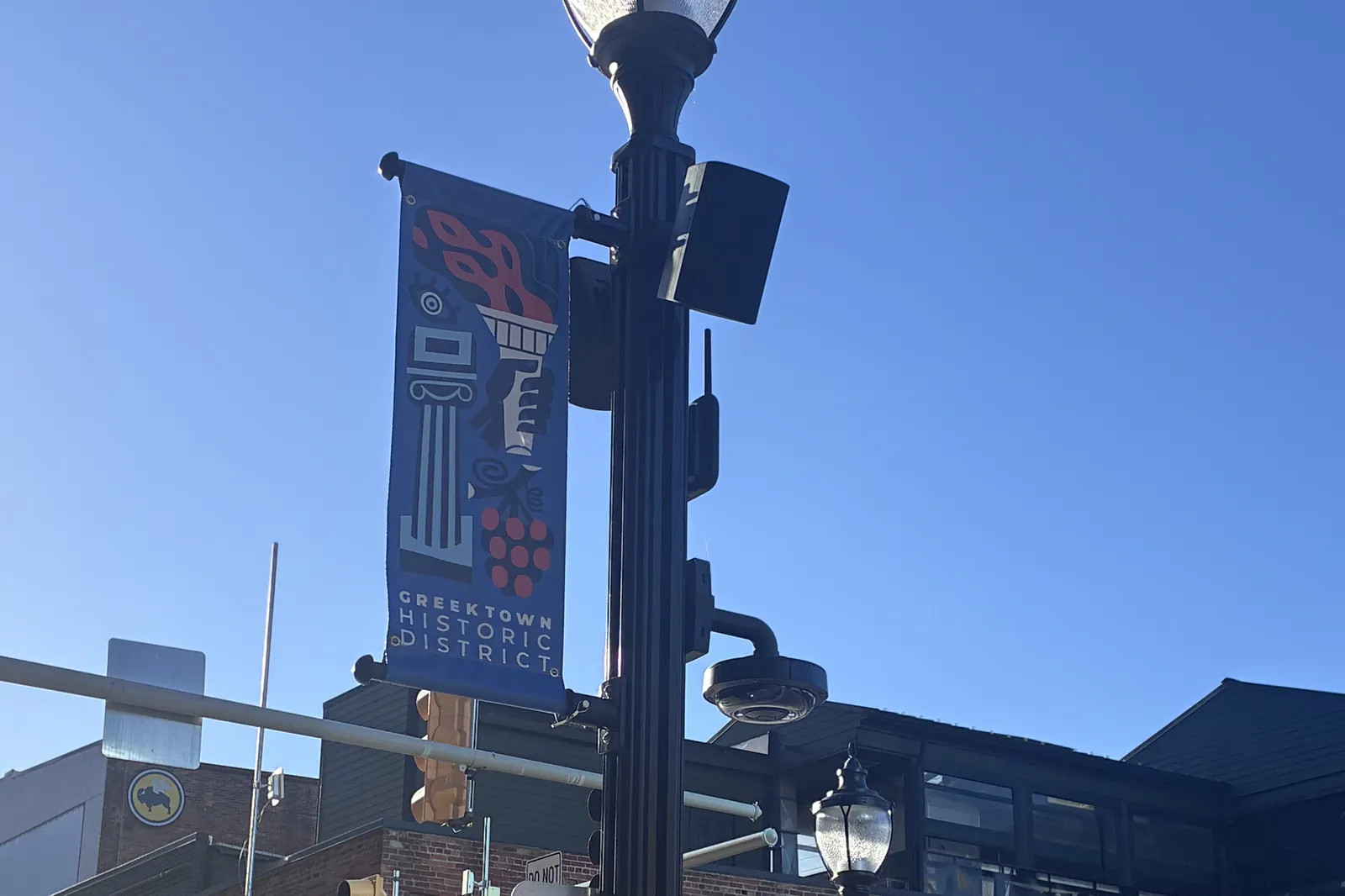
Greektown runs Zone Monitor across its district, alongside public Wi-Fi, smart poles and emergency audio built and operated by Cronus.
Questions
Zone Monitor FAQ
Can Zone Monitor detect open intoxicants and loitering?
Yes. Zone Monitor uses AI video analytics on your existing cameras to detect open intoxicants, loitering, fights, slip-and-falls, intoxication and crowd buildup, and sends alerts with the camera view to your security team. These detections are running today in the Greektown Smart District in Detroit.
Does Zone Monitor work with Project Green Light?
Yes. Zone Monitor runs on the same cameras that stream to the Real Time Crime Center at Detroit Police Department Headquarters through Project Green Light Detroit, so police get live video while your team gets counts and alerts.
What is Zone Monitor?
Zone Monitor is Cronus’s smart camera analytics service. It turns your existing security cameras into people counters that measure foot traffic, occupancy and dwell time, and alerts your team when an area gets too crowded.
Do I need new cameras?
Usually not. Zone Monitor works with standard IP cameras, including Axis, Hikvision and Hanwha. It reads the video stream directly, so your current video management system keeps recording as normal.
Does Zone Monitor use facial recognition?
No. Zone Monitor counts and tracks people as anonymous shapes moving through lines and zones. It does not identify who anyone is.
How accurate is the people counting?
In testing, Zone Monitor counted 7 of 7 people walking in and 7 of 7 walking out of a test clip. Accuracy depends on camera placement, so we help position counting lines where people are fully visible.
How far back does the data go?
Minute-by-minute counts are kept for 400 days by default, and you can export any period to Excel or pull it into your own systems through the API.
How many cameras can it handle?
One on-site computer can handle anywhere from about 8 cameras to more than 40, depending on the hardware. We size the system for your site.
See Zone Monitor on Your Cameras
Talk to a local Cronus expert about people counting, occupancy and crowd alerts for your site.